Employee Training Software for Small Business: What to Look For






Small business training often starts informally. A manager explains a process, a new hire reads a few documents, and someone tracks completion in a spreadsheet. That works for a small team, but it gets harder to manage as the business grows.
Over time, training materials spread across folders, chats, emails, shared drives, and one-off meetings. New hires get different onboarding depending on who trains them. Managers lose track of who has finished what. HR, operations, and department leads spend too much time on manual follow-up.
That is where employee training software for small businesses helps. The right platform gives growing teams a structured way to organize content, assign courses, guide employees through learning paths, track progress, keep training records, and report on completion. This guide explains what to look for, which features matter most, and how a platform like TechClass supports repeatable training workflows.
What is employee training software?
Employee training software, often used interchangeably with a Learning Management System (LMS), helps teams create, organize, deliver, assign, track, and report on learning programs. For small businesses, it acts as a single operational hub that replaces fragmented tools like spreadsheets, email threads, and manual file sharing.
Instead of relying on scattered checklists, shared folders, and repeated manager explanations, a business can manage training in one place. A training platform typically supports use cases such as:
It is not the same as a full HRIS, payroll system, or performance-management platform. Its purpose is more focused: helping businesses manage employee learning in a structured, trackable way.
Why small businesses need a structured training system
Informal training usually works until the team grows, roles become more specialized, or managers need to train several people at once. At that point, businesses need more consistency: a way to move from a scattered approach to a repeatable one.
Structured training moves you from "tell each person what they need to know" to "assign the right training, track completion, and keep records."
A structured system doesn't replace managers, coaching, or hands-on support. It gives them a clearer foundation to deliver consistent training, and it pays off beyond compliance.
of employees say they would stay longer at a company that invests in their development. For small teams, structured onboarding and training are one of the most practical retention levers you have.
Common small business training challenges (and how software solves them)
Most growing teams run into the same handful of problems. Here's how a training platform addresses each one.
Training leans on managers repeating themselves
Centralize repeated training so managers spend their time coaching and answering questions instead of re-explaining the basics.
New hires get inconsistent onboarding
Organize onboarding into assigned courses and learning paths so every new hire follows the same clear path.
Training materials are scattered
Keep courses, content, and resources in one place so employees always find the current version, not last year's slide deck.
Employees don't know what to complete
Assignments, learning paths, and notifications make required training and next steps obvious without manager reminders.
Managers lack visibility into progress
Progress tracking and completion views show training status at a glance, with no asking around or digging through messages.
Spreadsheet tracking becomes unreliable
Maintain dependable records, completion data, and reporting without the manual upkeep spreadsheets demand as you scale.
Essential features to look for
The best employee training software usually isn't the most complex platform. It's the one that helps your team organize learning, assign the right training, track progress, and maintain visibility without adding administrative work.
Turn documents, videos, SOPs, and product info into structured courses in one consistent format.
Organize new-hire content, assign required training, and track each person's progress from day one.
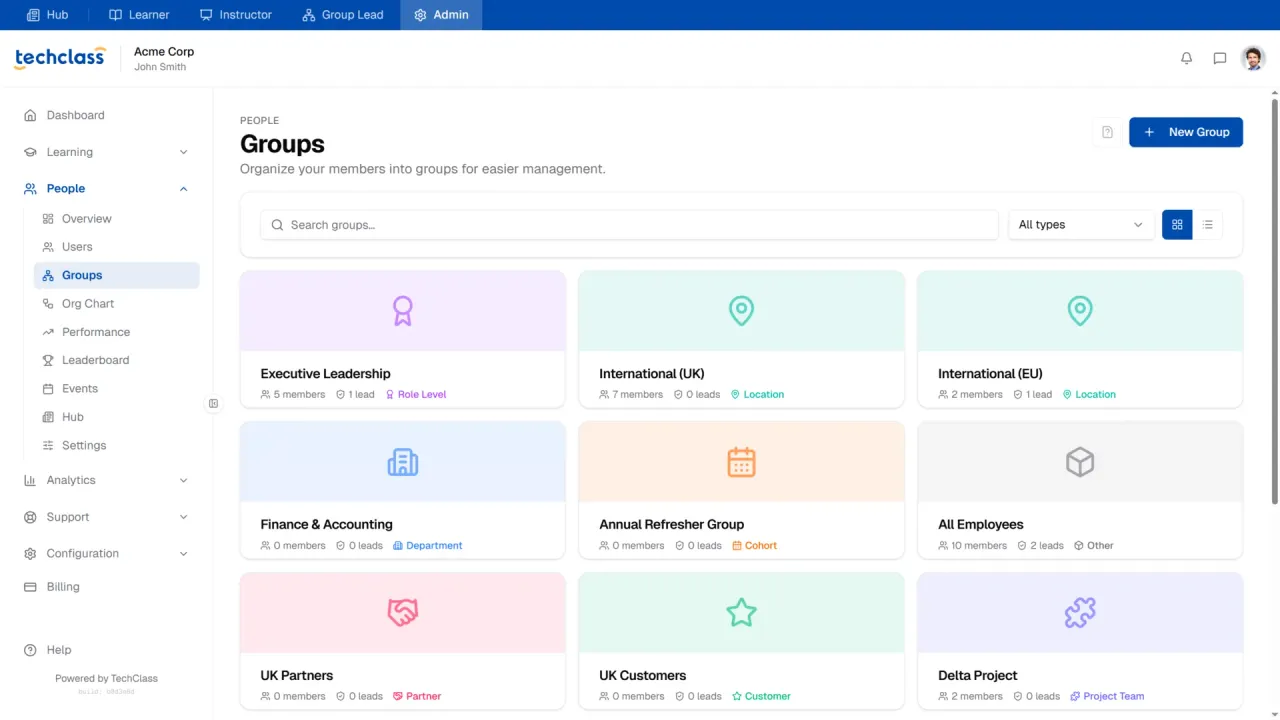
Assign training by person, role, team, or program so it's always clear who needs to complete what.
Sequence multiple courses into a logical order so employees never have to guess what comes next.
Give sales, support, managers, and operations only the training that's relevant to their role.
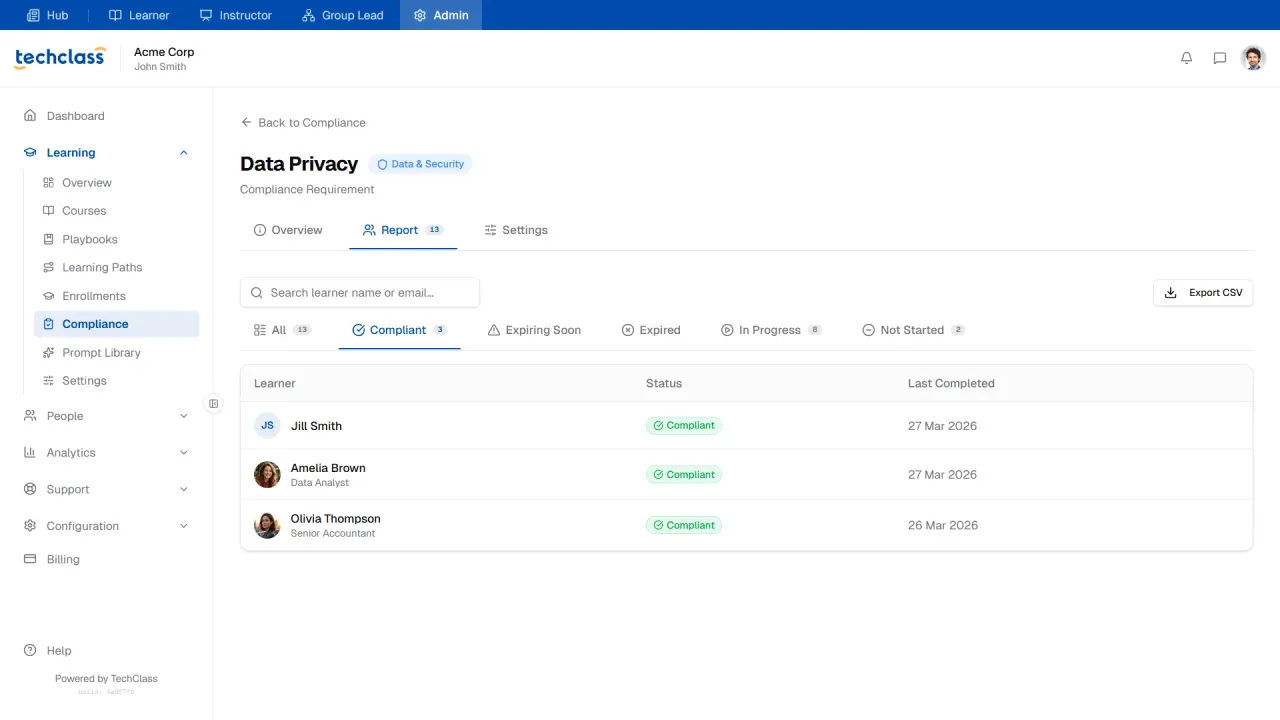
See who has started, who's finished, and who still needs a nudge, without chasing people.
Keep a central, lasting record of completed training instead of scattered spreadsheet notes.
Issue proof-of-completion certificates where onboarding or internal programs call for them.
Review completion across people, teams, and groups so you know where follow-up is needed.
Keep employees aware of assigned and upcoming training automatically, so follow-up isn't all manual.
A simple interface so employees can find and finish training without help from IT.
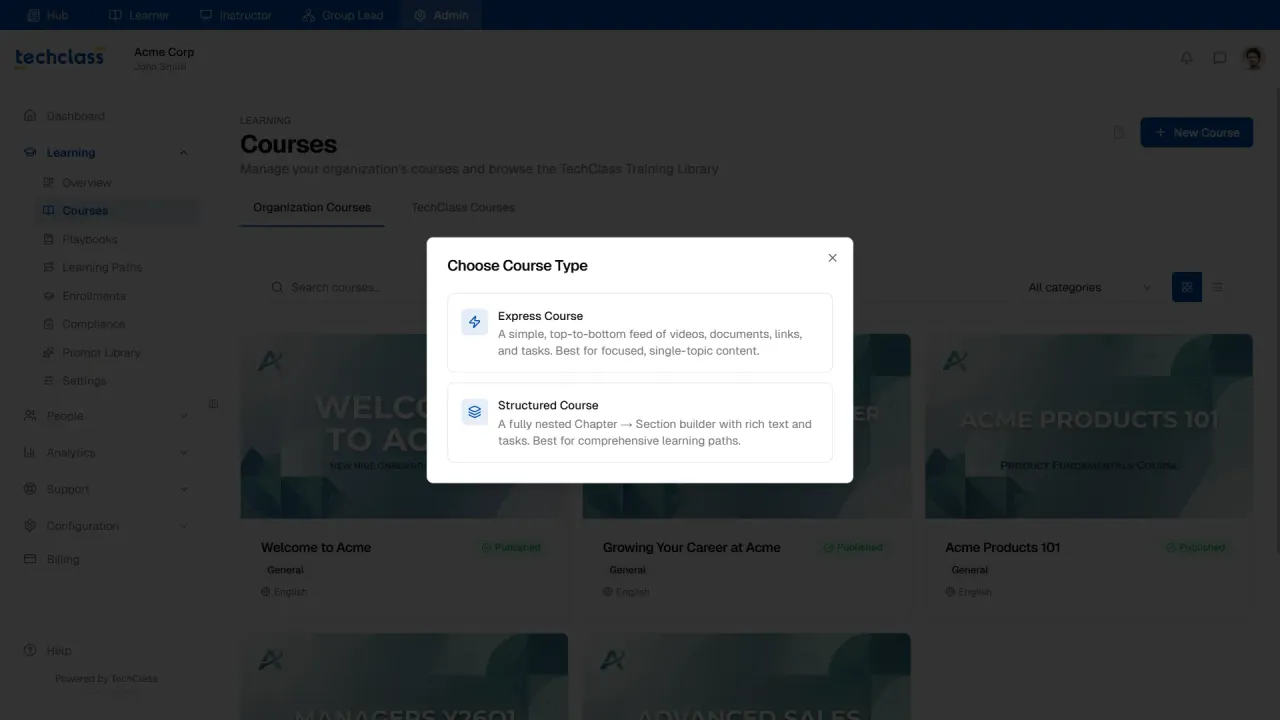
Turn existing knowledge into structured courses
Small businesses need a simple way to convert what they already know (documents, videos, SOPs, onboarding materials, product and service guides) into structured training. Look for software that organizes this into courses employees can access in a consistent format. TechClass helps teams create, deliver, and manage learning programs in one structured environment, which is useful once content has outgrown scattered folders and one-off explanations.
Guide employees with learning paths
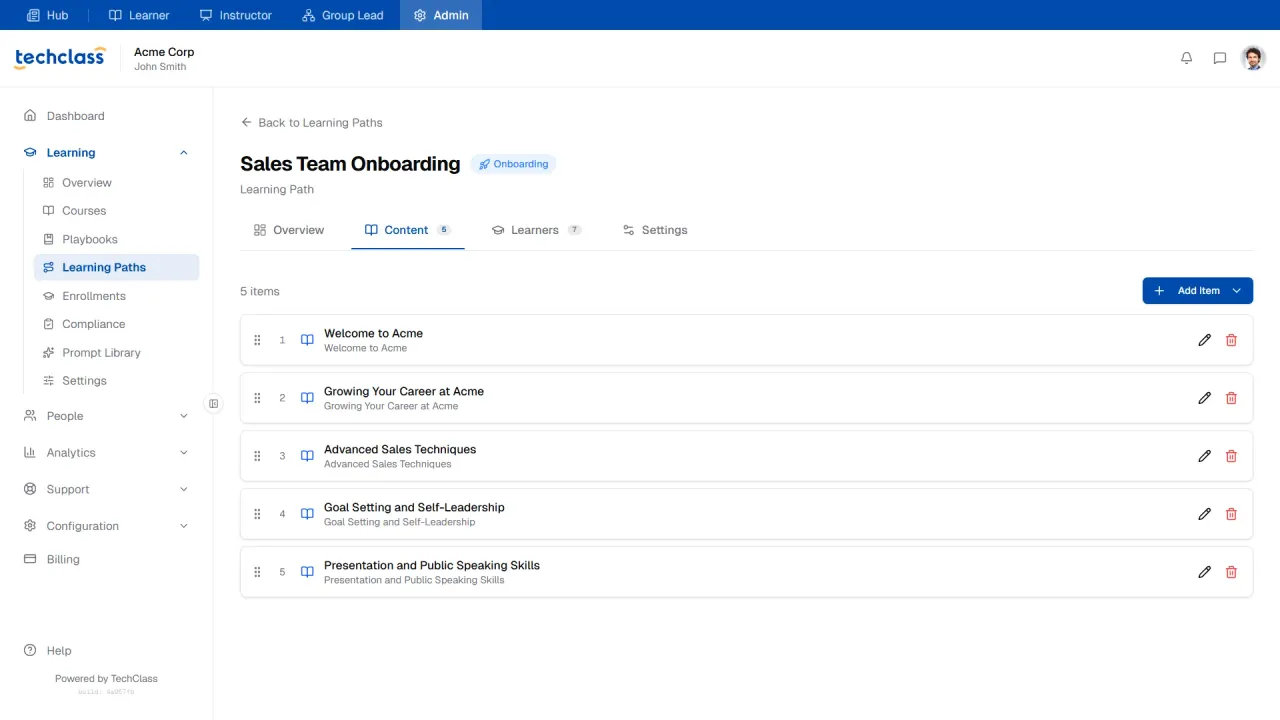
Learning paths organize training into a sequence, useful when employees need to complete multiple courses in a logical order. For small businesses, they support onboarding, company culture, cybersecurity awareness, customer service, sales and product knowledge, manager development, compliance, and recurring refreshers. The result: employees aren't left guessing what to complete next.
Explore how TechClass helps small businesses create, deliver, track, and manage employee training in one place.
Book a demoHow employee training software helps small businesses
The same platform supports a wide range of everyday training workflows, without sending every course to every employee.
Onboard new employees
Give every new hire a consistent starting point with assigned courses and tracked completion.
Role-specific training
Teach the tools, processes, and responsibilities tied to each position.
Product & service training
Centralize offerings, messaging, and delivery standards, and update them as things change.
Process & SOP training
Turn standard operating procedures into structured courses so everyone learns the same version.
Compliance training
Assign, track, and record compliance-related training (it is not a substitute for legal or regulatory systems).
Customer-facing training
Align service standards, communication, and escalation workflows across the team.
Sales training
Build structured product, positioning, and process training that goes beyond informal shadowing.
Manager training
Develop new and existing managers with repeatable learning paths.
Recurring staff training
Keep refreshers and updates on schedule with assignments, reminders, and records.
How to choose the right platform
Before choosing employee training software, define what your business needs to manage now, and what it may need as the team grows. Use these questions to compare options.
| Ask yourself | Why it matters |
| What training needs to be centralized? | Confirms the platform can organize your current courses, documents, SOPs, and onboarding content. |
| Who needs to assign training? | Clarifies whether HR, operations, managers, or department leads need assignment capabilities. |
| Can it support onboarding? | Helps new employees follow a consistent path instead of relying on informal instruction. |
| Can it support role- or group-based training? | Makes it easier to assign relevant training by team, role, department, or responsibility. |
| Can managers track progress? | Gives managers visibility into who has started, completed, or missed assigned training. |
| Can the team maintain training records? | Reduces reliance on spreadsheets and scattered completion notes. |
| Are certificates needed? | Supports proof of completion when certificates matter for internal programs. |
| What reports are required? | Helps HR, operations, and managers review training status across employees or teams. |
| Is the learner experience simple? | Makes it easier for employees to find assigned training and understand what to complete. |
| Can it scale as the business grows? | Supports more employees, courses, teams, and repeatable workflows over time. |
| Is the tool focused enough for small business needs? | Helps you avoid unnecessary complexity from systems built mainly for large enterprises. |
How TechClass supports employee training in your small business
TechClass is a learning management platform that helps organizations create, deliver, manage, and track employee learning programs. For small businesses, it's especially useful when training has become too scattered or manual. Instead of relying on repeated explanations, shared folders, and spreadsheets, teams can organize training in one structured platform through capabilities such as:
These capabilities map directly to common small business problems. When materials are scattered, TechClass organizes courses and content in one place. When employees are unsure what to complete, assignments and learning paths give direction. When managers lack visibility, progress tracking, completion visibility, and reporting show status. When HR needs documentation, training records and certificates keep a clear history. For smaller teams specifically, a right-sized LMS for small business keeps this manageable as you grow.
TechClass isn't a replacement for managers, hands-on coaching, HR systems, payroll tools, legal compliance systems, or performance management platforms. Its role is focused: helping small businesses manage employee learning programs more clearly and consistently, and giving growing teams a structured way to create, assign, track, and report on training without depending only on informal processes.
Bring your team's training into one place
See how TechClass helps small businesses create, deliver, assign, track, and report on employee training, without enterprise complexity.
Frequently asked questions
What is the best way for a small business to train employees?
The best way for a small business to train employees is to combine structured employee training software with hands-on manager support. Training software helps organize courses, onboarding materials, learning paths, assignments, progress tracking, certificates, and training records. Managers can then provide coaching, context, feedback, and role-specific guidance.
When should a small business move beyond spreadsheets for employee training?
A small business should move beyond spreadsheets when tracking completion becomes difficult, onboarding is inconsistent, training materials are scattered, managers repeat the same instructions, or employees in different roles need different training paths. Employee training software makes training easier to assign, monitor, and manage.
What features should small business employee training software include?
It should include course management, onboarding support, course assignments, learning paths, role-based and group-based training, progress tracking, completion visibility, training records, certificates, reporting, notifications, and an easy learner experience. These features help deliver consistent training without relying on manual tracking.
Is a small business LMS different from employee training software?
A small business LMS and employee training software are closely related, and the terms often overlap. A small business LMS is a learning management system used to create, deliver, manage, and track training programs. Employee training software focuses on practical training workflows such as assigning courses, tracking employee progress, managing training records, and reporting on completion.
Can employee training software help with onboarding?
Yes. It can improve onboarding by organizing new-hire training, assigning required courses, creating onboarding learning paths, tracking new-hire progress, and giving managers visibility into completion. It does not replace manager support, but it helps make onboarding more consistent and repeatable.
How does TechClass support employee training for small businesses?
TechClass helps teams create, deliver, manage, and track employee learning programs. It includes course assignments, learning paths, role-based learning, groups, progress tracking, completion visibility, training records, completion certificates, reporting, notifications, and tools for scalable employee development.